
Seven posts got us here:
- the control core that talks to the radio
- the lossless web audio path with Direwolf
- the satellite tracking math
- the PTT hardware
- benchctl, the bench automation
- the PTT bench validation
- wiring the PTT gate into the software and the first real transmission
Each of those got one subsystem working on its own. Everything runs end to end now, so this post is a tour of the console as it stands. Open a browser, point it at the daemon, and the whole IC-910H is in front of you. Where something has internals worth reading, I link back to the post that covers it.
The layout#
The nav across the top is one tab per job: Radio, Repeaters, Satellites, Tracking, TNC, Settings. A strip pinned above every page carries the audio controls, a PTT button, and the transmit state, so I can hear the radio and key it from wherever I am in the app.
The defaults lean cautious on purpose. Transmit stays off until I arm it, a stuck key times out on its own at 180 seconds for voice and 30 for data, and the squelch gates follow the radio’s own hardware lines unless I open them by hand.
Radio page#
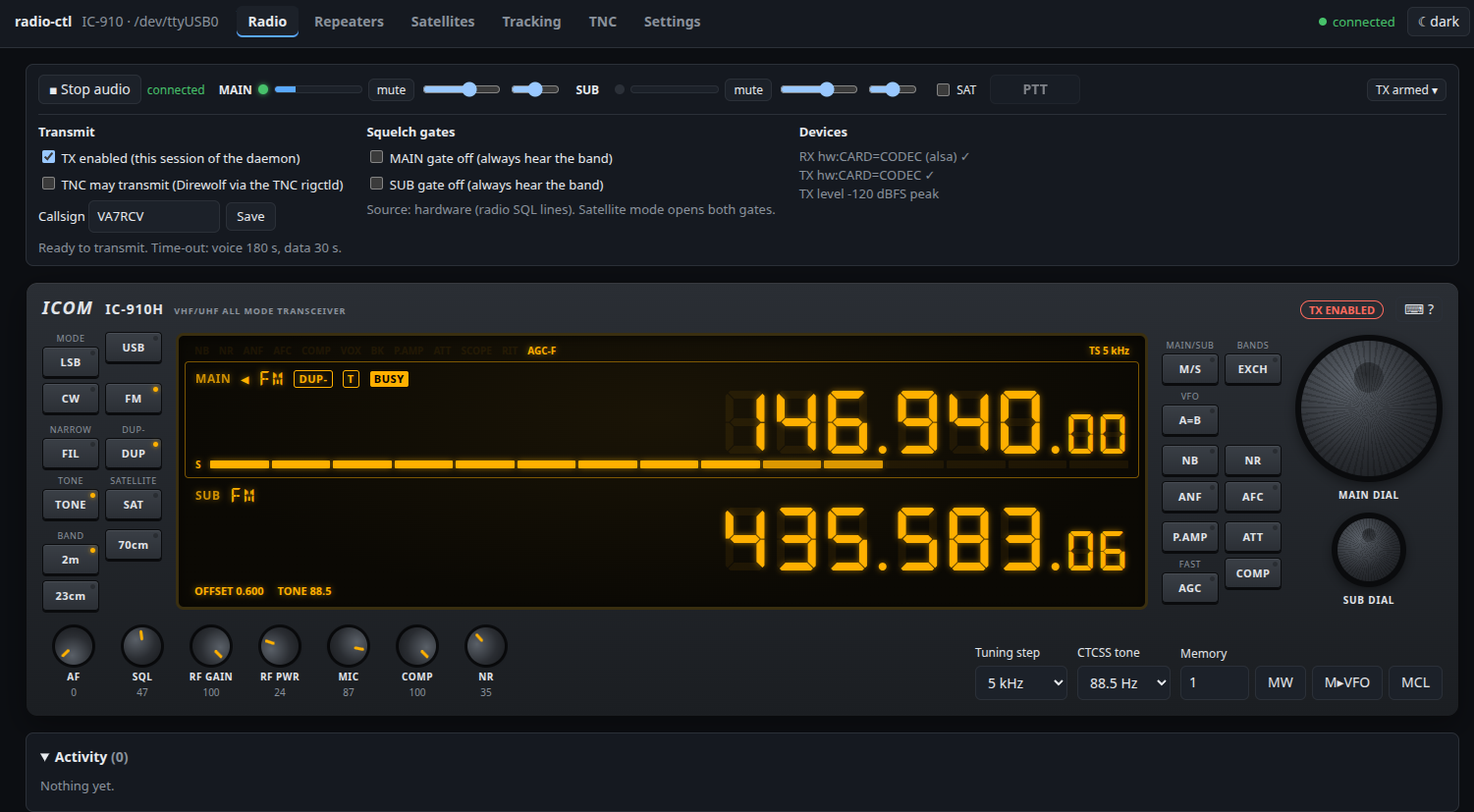
The Radio page is a faithful IC-910H skin, and it is my favorite part of the whole project. Mode, band, the two VFOs, the dials and the row of knobs are all there, drawn to match the real panel. In the shot MAIN sits on 146.940.00 FM with a minus-duplex repeater shift and an 88.5 tone, and SUB is parked on 435.583.06.
It also mirrors the physical radio live. Turn the real front-panel dial and the display here moves to match, because the daemon reads the radio back rather than only writing to it. That read-back loop is the premise of the control core. I still watch it track the dial on the radio sitting next to the screen.
Here it is listening to a repeater through the browser:
Repeaters page#
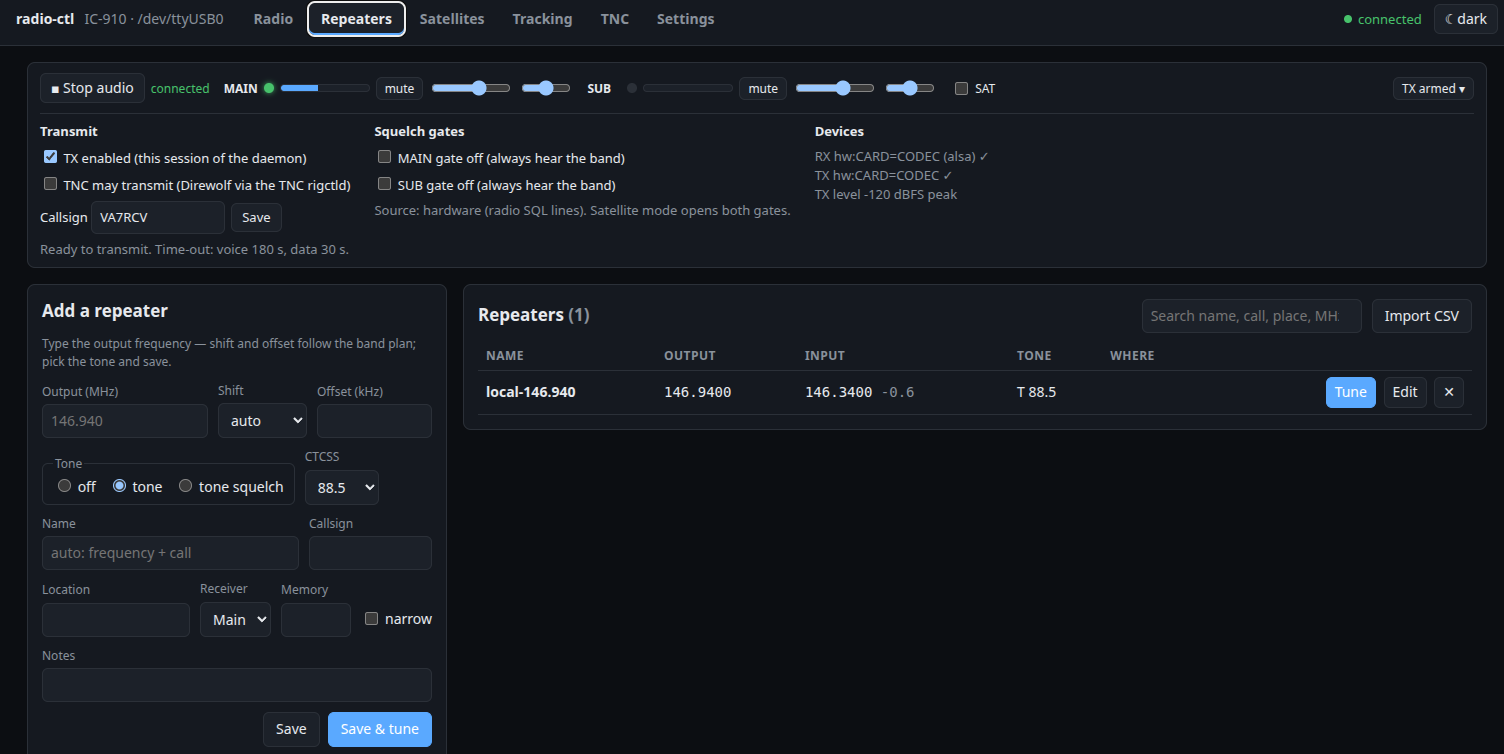
The Repeaters page is pure convenience. I type a repeater’s output frequency and the shift and offset fill themselves in from the band plan, I pick the tone, give it a name, and save. The saved list shows each repeater’s output, input and tone, with a Tune button that sets the radio to it in one click, shift and CTCSS already applied. A CSV import brings in a whole region at once. No more thumbing the dial and trying to remember whether this one is a minus offset.
Satellites page#
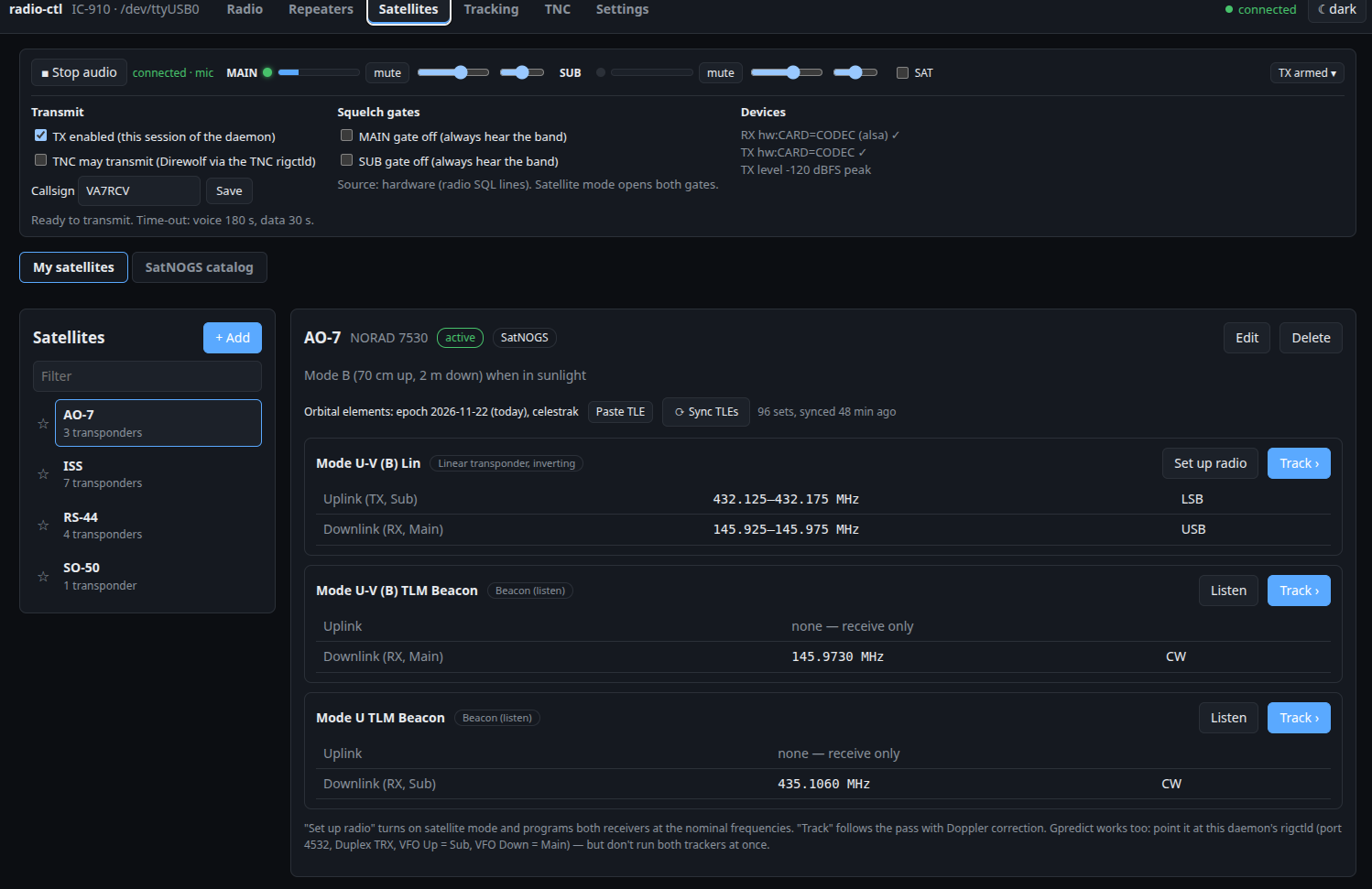
The Satellites page is my transponder database. Each satellite carries its transponders with real frequency ranges. AO-7 in the shot is a Mode B linear transponder that inverts: uplink 432.125-432.175 MHz LSB on SUB, downlink 145.925-145.975 MHz USB on MAIN, plus its CW beacons.
The orbital elements come from CelesTrak and sync on their own (96 sets, last pulled under an hour before the screenshot), and I can paste a TLE by hand for something fresh off the pad.
Set up radio turns on satellite mode and parks both receivers at the nominal frequencies. Track follows the pass with Doppler correction. Gpredict works too if you prefer it: point it at the daemon’s rigctld on port 4532 as a Duplex TRX, VFO up on SUB and down on MAIN. Just do not run both trackers at once, or they fight over the dial. The correction math is in the satellite tracking post.
Tracking page#
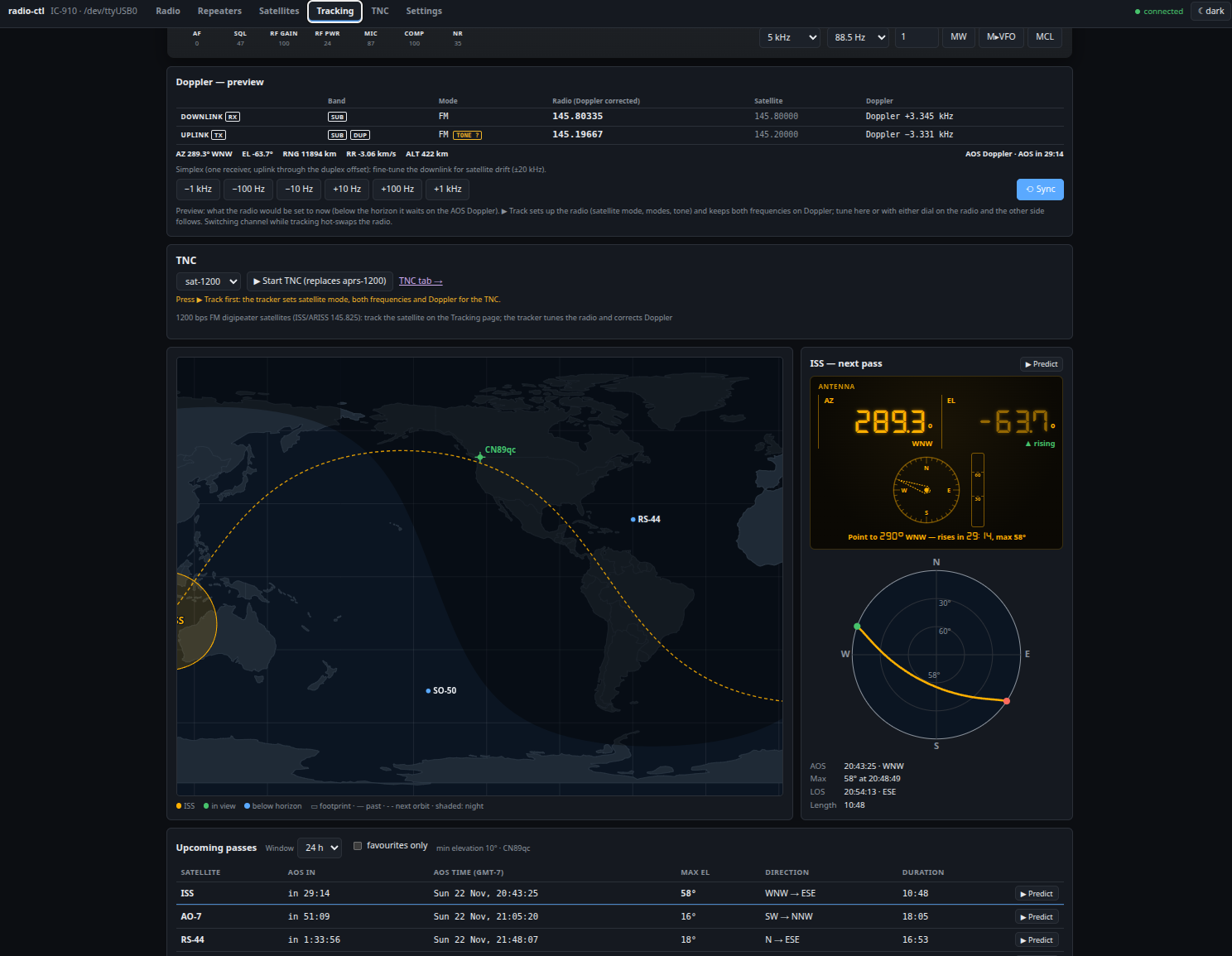
The Tracking page is the live pass view, dense on purpose. The Doppler preview shows the actual numbers: an ISS downlink nominal 145.80000 MHz pulled up to 145.80335 by a +3.345 kHz shift, the uplink corrected the other way down to 145.19667. This is a simplex satellite, so both sides ride the radio’s duplex offset on one receiver. Next to the frequencies are the live look angles (azimuth, elevation, range, range rate) and a countdown to the next AOS.
A world map draws the ground track and footprint, an antenna gauge shows where to aim, and a polar plot shows the arc of the coming pass. The upcoming-passes table lists what is next with max elevation and direction: ISS in about half an hour at 58 degrees, then AO-7 and RS-44 later the same evening.
Once Track is running the daemon holds both frequencies on Doppler for the whole pass, and I can still nudge either dial, with the other side following to stay in step.
TNC page#
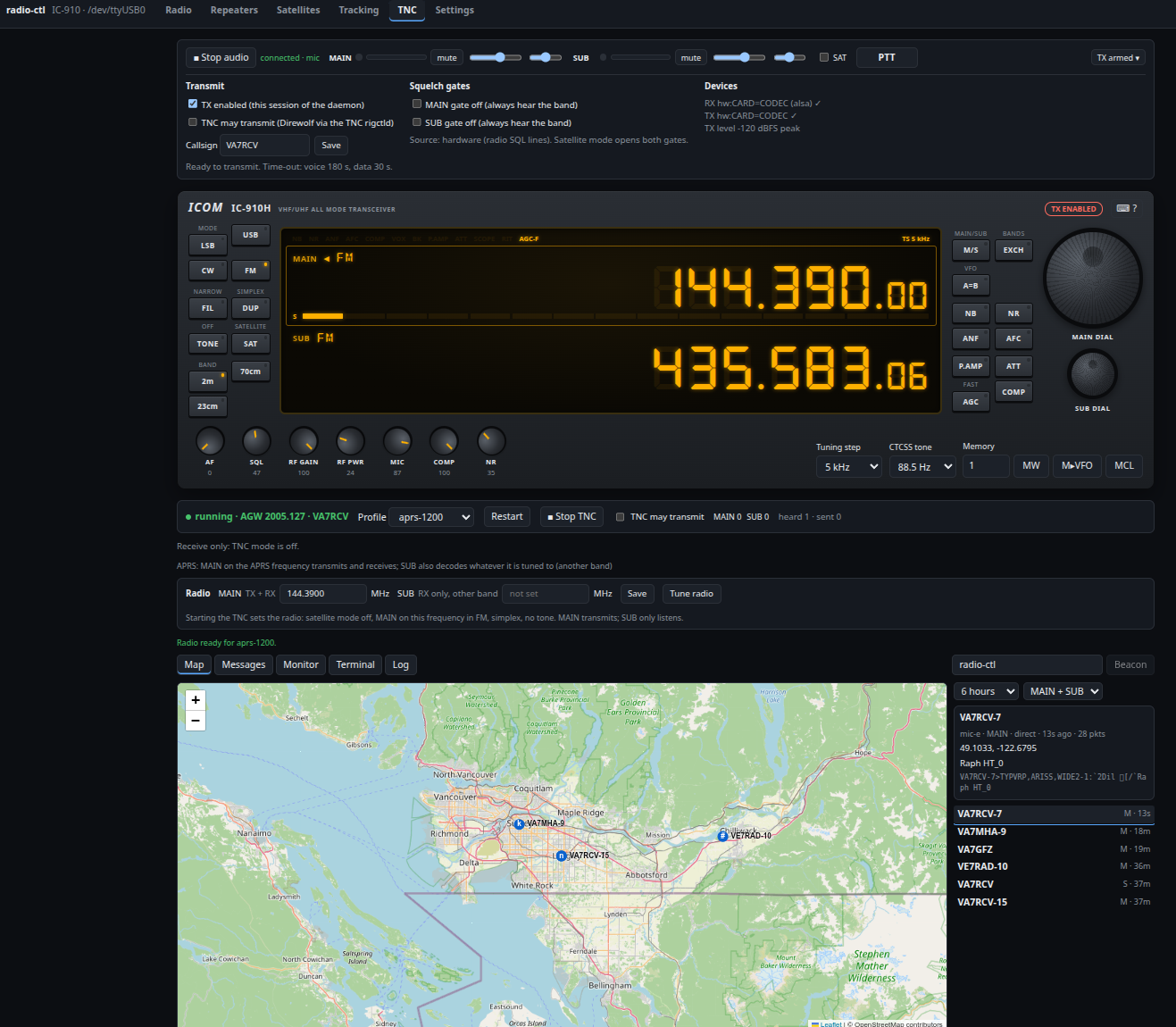
The TNC page runs the software modem, Direwolf, on the 1200-baud APRS profile. Starting it sets the radio in one move: 144.390 MHz, FM, simplex, MAIN transmitting while SUB keeps listening on whatever else I have it tuned to.
Below sits a live map of the APRS stations it decodes off the air, each with how long ago it was heard and how many packets it has sent. In the shot a handful of local stations are plotted around the Fraser Valley.
It stays receive-only until I check “TNC may transmit”, which is the guard rail I want on a transmitter driven by a web page. The audio feeding Direwolf is the lossless UDP path from the web audio post.
Proof it left the building#
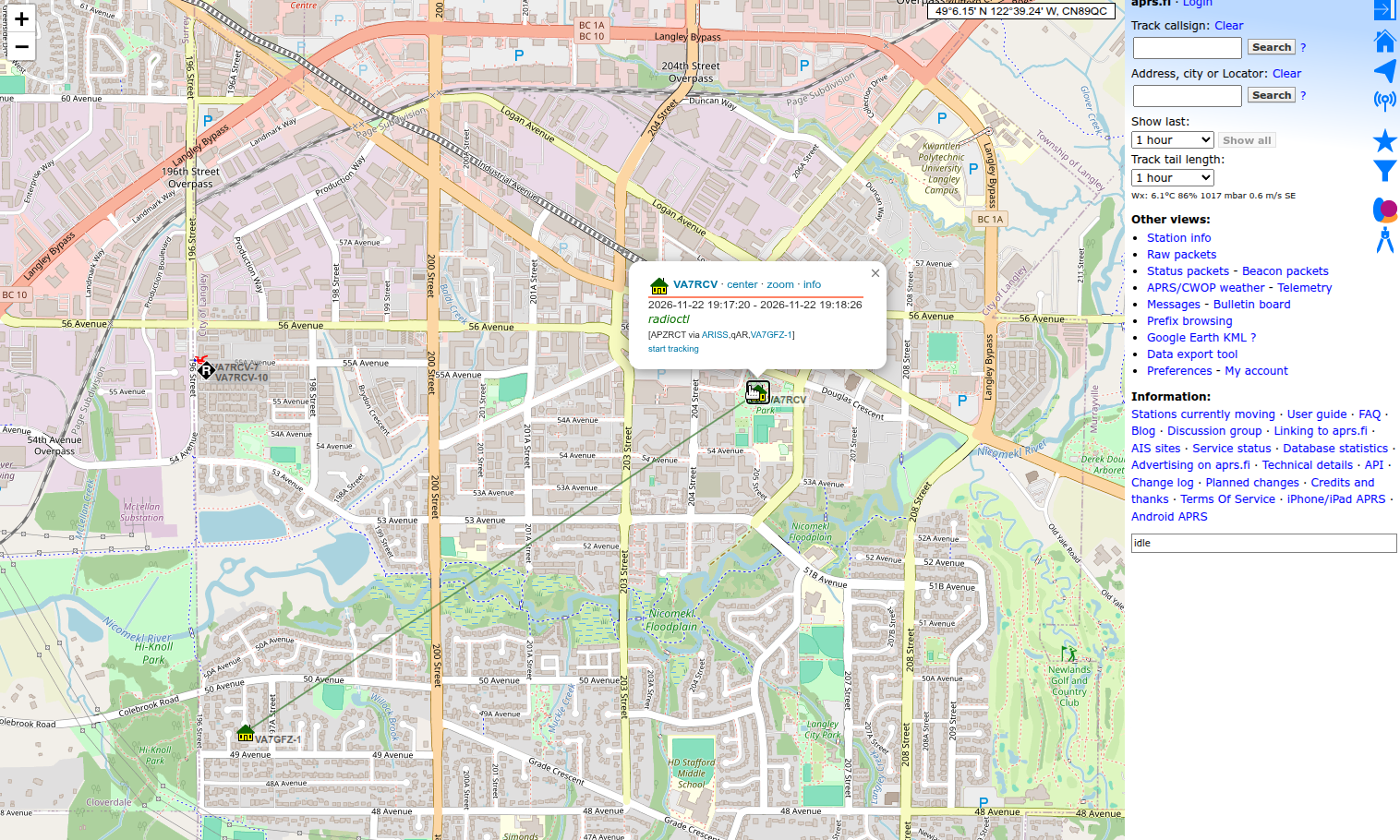
Decoding other people is one thing. Getting heard is the test. Here is aprs.fi, a public third-party site, showing the VA7RCV station that radio-ctl put on the air near Langley BC (grid CN89QC), comment “radioctl”, path [APZRCT via ARISS,qAR,VA7GFZ-1], timestamp 2026-11-22 19:17:20. That is independent confirmation that the audio radio-ctl keyed out the DATA socket in post 7 made it onto the global APRS-IS network. A packet I generated in a browser reached a server I do not run, relayed by a station I have never met.
And a video of APRS running through radio-ctl: